The console
How a program starts BeeBEEP's console, connects to it, authenticates and then sends commands and listens to events.
Per: sviluppatori, amministratori · Da BeeBEEP 6.0.0 · Aggiornata il
Alcune pagine sono solo in inglese.
The console is a local socket through which a program drives a running BeeBEEP: it reads chats and contacts, sends messages and files, manages groups, and hears what happens as it happens. This page is for whoever writes a bot or an integration, and for whoever starts BeeBEEP for one. It takes you from starting the console to a working bot; the list of commands is on the commands page and the list of events on the events page.
What the console is
The console is a local channel. A program on the same computer, run by the same operating system account as BeeBEEP, opens a socket and talks to BeeBEEP in lines of JSON. It is not a way to administer BeeBEEP from another computer, and nothing makes it one: it has no network address. Other computers are reached by BeeBEEP itself, over the network, as always.
A conversation has three kinds of line, and each one carries a key that names its kind:
| Line | Sent by | Its key | What it is |
|---|---|---|---|
| command | your program | cmd | a request: {"cmd":"status"} |
| reply | BeeBEEP | ok | the answer to one command |
| event | BeeBEEP | event | something that happened, with no request |
The first line BeeBEEP sends is a fourth, the banner, with the key banner. A client tells the kinds apart by the key a line has.
Every connection holds a scope: what it may do. A program that holds less than a command needs is refused, so a bot can be given exactly the power it needs and no more. The scopes are described below.
The headless program beebeep-relay, which has no other interface, has the same console, with the same commands and options.
Start the console
The console is off until you ask for one, in one of five ways.
| Start | A connection holds | After auth |
|---|---|---|
| Settings > Automation, on a computer | none | the one scope you chose, read or user |
--console-name alone | user | auth is refused: there is no password |
--console-name with --console-password-file | none | the scope of the role whose password matched |
either of these with --console-max-scope | capped at that scope | capped at that scope |
--console-name with --console-debug | debug | auth is refused: there is no password |
Read the table by its first column: a console started without a role file never gives admin, and one started with --console-debug is for development only (see the scopes).
From Settings
Open Settings > Automation (only on a computer). Under What a program may do choose Look only or Act as you, then switch Console on. BeeBEEP shows the Address of the socket and a Password, both new at each switching on and never written anywhere; give them to your program, which sends the password with auth. While a program is connected the window says so, and Automation shows how many are. The console is off again at every start of BeeBEEP, and switching it off closes every connection with a farewell.
The password of this start gives only the scope you chose, never more. Under Folder for files you can choose the one folder a program acting as you may use files from; it is the file root, with the same rules. With no folder a command that names a file on this computer needs admin, so it is out of reach here. BeeBEEP remembers the folder, and Stop using this folder makes it forget, deleting nothing. If you start BeeBEEP with --console-file-root, that folder is shown instead and cannot be changed from Automation.
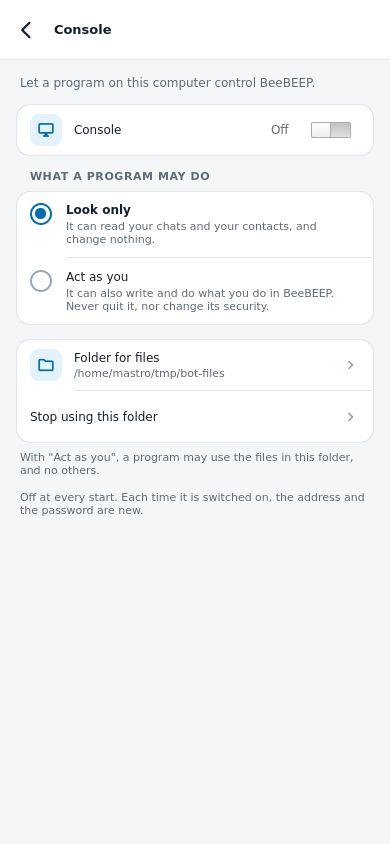
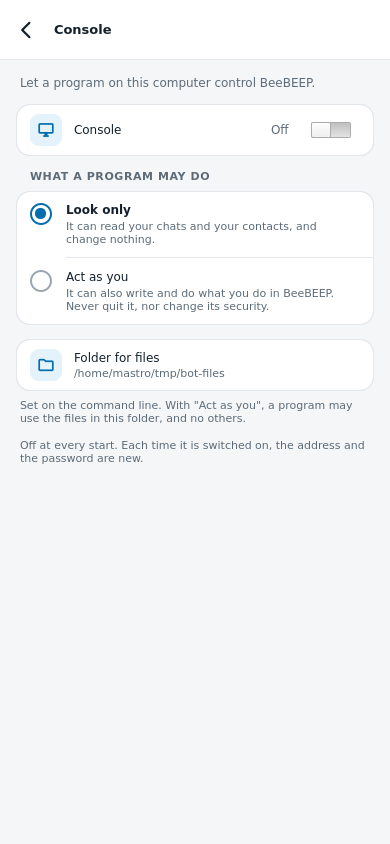
A console started from the command line is shown in Automation, read only, and cannot be switched off from there.
From the command line
When no window is wanted, beebeep --no-gui runs BeeBEEP with no window at all, and you drive it through the console. A computer with no usable keyring needs --secret-file as well, as settings for administrators says.
| Option | What it does |
|---|---|
--no-gui | runs with no window and no interface other than the console; computers only |
--console-name=<name> | starts the console; the name is a plain name or an absolute path, see where the socket is |
--console-password-file=<path> | a file of roles and passwords, see the role file; needs --console-name |
--console-max-scope=<scope> | read, user or admin: no connection holds more, whatever password it presents; needs --console-name |
--console-file-root=<folder> | the one folder a connection below admin may name files in, see files; given alone it holds for the console you switch on in Settings; with --no-gui it needs --console-name |
--console-debug | every connection holds debug with no password; for development only; needs --console-name and excludes the three options above |
The smallest start is a console that gives user, and no more, to any program of yours on the computer:
beebeep --no-gui --console-name=my-bot
A bot that must authenticate, and never get more than user:
beebeep --no-gui --console-name=my-bot \
  --console-password-file=/path/to/roles.txt --console-max-scope=user
BeeBEEP checks every combination at start and exits with code 1 and a message when two options contradict each other: --console-debug beside a role file, a cap or a file root; any of the four without --console-name; a cap other than read, user or admin; an option written without its = (--console-max-scope read); an option that takes one value given twice.
Where the socket is
A plain name, with no /, lands in a private folder of your account. On Linux that is $XDG_RUNTIME_DIR/beebeep/<name>, for example /run/user/1000/beebeep/my-bot. BeeBEEP creates the beebeep folder closed to everyone else, and refuses to start if it is not yours and closed. On Windows the console is a named pipe, \\.\pipe\<name>, for example \\.\pipe\my-bot. There is no folder: any name, a path included, is only the pipe's name, so the rules below about folders and paths do not apply there.
An absolute path is taken as given, when it is safe: every folder on it belongs to you or to the administrator account and none can be written by others, and the socket's own folder is not under a link. A path under /tmp is refused, because whoever took the name while BeeBEEP was not running would receive what a client sends, its password included. On macOS some folder of the path must also be closed to everyone else (a folder you made with chmod 700). A refusal names the folder and what to do instead. A socket path of more than 100 bytes is refused too.
Only your operating system account, and the administrator account of the computer, may open the socket. On Windows only your account may open the pipe, from a program run as administrator too; another account cannot, an administrator's included. Pipe names are shared by every account of the computer, so a name another program already holds is refused at start. While BeeBEEP is not running, though, nothing stops another account from making a pipe of that name: a client of yours that sends a password should first check that the pipe's owner is your account, as scripts/beebeep_console.py does. A second BeeBEEP that asks for a name already in use exits with code 1, saying which process holds it, on Windows too. A socket left behind by a crash is removed by the next start.
The Python tool scripts/beebeep_console.py of the source tree computes the same path from a plain name, and is an interactive client for a first try:
python3 scripts/beebeep_console.py --attach --socket my-bot \
  --password-file /path/to/roles.txt --role read
On Windows it opens the pipe, given its name or the whole address that Settings shows:
python scripts\beebeep_console.py --attach --socket my-bot --password-file C:\path\to\roles.txt --role read
Connect and read the banner
Connect to the socket as a stream. The format is one JSON object per line, in both directions, each line ending with a newline. BeeBEEP answers the commands of a connection in the order it received them, and may put an event line between your command and its reply (see events).
A malformed line, a refused command or a failed one never closes the connection: only that line's own reply says what went wrong. The few things that do close it are listed under limits.
Before you send anything, BeeBEEP sends the banner:
{"banner":"BeeBEEP version 6.0.0-1234 - console mode","scope":"user","version":"6.0.0-1234"}
scope is the scope the connection starts with, so a program knows what it holds without trying: none when the console wants a password, user for a console with no role file, debug (with "debug":true) under --console-debug. version is the program's own version. The banner is sent before authentication; it carries nothing private.
Scopes
Every command, and some arguments, declare a scope. The scopes are nested: each one holds the powers of the ones before it.
| Scope | What a connection may do |
|---|---|
none | nothing but auth; the scope of a connection that has not authenticated under a role file |
read | look: chats, contacts, groups, files, settings; change nothing outside its own connection |
user | what a person does from the screens: send, react, create a group, accept a file, set a contact, change a setting that Settings shows |
admin | what ends the program, cuts it off the network or changes whom it trusts: quit, the network password, blocking a contact, the two settings that accept keys and files by themselves, and every file on the computer |
debug | the commands of development; they do not exist unless the console was started with --console-debug |
A command above the connection's scope is refused with the code scopeTooLow; an argument above it is refused by name, too, rather than ignored. At user, whether a command is allowed is then judged by BeeBEEP as it is in the window: a group command from someone who does not administer the group fails, and the reply says why.
What a connection may do is also what it may see: help lists only the commands and arguments of its scope.
Authenticate
Under a role file a connection starts at none. It presents a password with auth:
{"cmd":"auth","password":"a-bot-password"}
BeeBEEP answers with the scope the connection now holds:
{"ok":true,"data":{"scope":"user","capped":false}}
capped is true when --console-max-scope lowered the scope below what the password's role gives. A second auth on the same connection replaces the scope, up or down. Authentication is per connection: a new connection starts again at the scope of its start.
Before auth, every line is answered with the code notAuthenticated, help and quit included, whatever the line holds, so nothing about the console leaks before a password. A wrong password is answered with invalidPassword and changes nothing; the third wrong password on one connection closes it, after the reply. A connection at none hears no event either.
The password travels as plain text inside the JSON, over a socket that no other computer can reach.
The role file
--console-password-file names a text file with one line for each role the console may give, <role>:<password>, the role being exactly read, user or admin:
admin:correct-horse-battery-staple
user:a-bot-password
read:a-dashboard-password
The lines may come in any order and each role at most once; a role with no line cannot be reached. A line is split at its first colon, so a password may contain one; spaces around the password are dropped, as are a Windows line end and a byte-order mark at the start of the file, and a blank line is skipped. Keep the file readable by you alone.
Anything else stops BeeBEEP at start, with exit code 1 and a message naming the line and never the password: a line with no colon, an unknown role, a debug line (that scope has its own option), a role given twice, an empty password, two roles with the same password, a file with no role, a file saved as UTF-16, a file that cannot be read.
There is no option that takes the password itself: a command line is visible to every other program of the computer. Read a password from a file or from the environment, as the example does.
Files
send_file, send_voice_message, set_avatar and set_group_avatar name a file on this computer, and a bot that reads chat text could be asked by any user to send ~/.ssh/id_ed25519. So a connection below admin may name a file only inside the console's file root, the folder given with --console-file-root or chosen in Settings > Automation. Without a file root a command that takes a path needs admin: help marks the argument with the admin scope, and a connection below it does not see the command in help at all.
With a file root, a connection below admin names a file:
- by a path relative to the root (
photo.pngis<root>/photo.png), never to the working directory of the program; - or by an absolute path that, with every
..and every link resolved, ends at a regular file inside the root: a folder, a device and a link that points out are refused.
A path outside the root and a file that does not exist get the same reply, pathNotAllowed, so that a connection cannot learn what exists. At admin and above the root does not apply: the path is used as given, a relative one from the working directory of BeeBEEP.
BeeBEEP checks the root at start and exits with code 1 when it is not an absolute, existing, readable folder, when it holds the data folder (it is the data folder or one above it, as / and a home folder are) or when it holds the console password file, the master secret file or the network password file. --console-file-root is refused beside --console-debug. Automation refuses a folder for the same reasons and says why; a chosen folder that later fails the check leaves the console with no file root.
What BeeBEEP writes, such as a file it receives, goes to the download folder as usual: no command writes to a path a client names.
Replies
Every command is answered by one line, with the key ok:
{"ok":true,"data":{}}
{"ok":false,"error":"user not found","code":"userNotFound"}
data is always there on success, empty ({}) when the command has nothing to say. What each command puts in it is on the commands page.
An error carries error, a sentence for a person that may be reworded or translated, and often code, a word that never changes. A reply may have no code: a refusal of BeeBEEP's state (a file offer that does not exist, a chat it does not know) carries only error. Test the code when there is one and the text when there is not.
Reply codes
help lists every code as codes.
| Code | Refused because |
|---|---|
notAuthenticated | a line other than auth came before a successful auth under a role file |
invalidPassword | auth with a password no role has |
noPasswordConfigured | auth where the console has no role file, or under --console-debug |
malformedJson | the line is not a JSON object |
unknownCommand | the command does not exist, or is above the connection's scope, also when asked with help |
missingField | a required field is missing, cmd included; the text names it |
scopeTooLow | the command, or one of its arguments, is above the connection's scope |
pathNotAllowed | the file is not inside the console's file root, or does not exist |
unknownEvent | subscribe named an event the connection cannot hear |
invalidType | an argument has the wrong JSON type: a number for a text, a bool for an id |
invalidValue | an argument has the right type and a value outside its bounds, or is a list that must not be empty |
defaultChatTooManyPeople | send_message to BEEP while too many people are online |
defaultChatTooLong | send_message to BEEP with a text over 200 bytes of UTF-8 |
defaultChatTooFast | send_message to BEEP faster than one message every 2 seconds on average, after three in a row |
defaultChatNobodyOnline | send_message to BEEP while nobody online can receive it: nothing is sent or kept |
defaultChatTextOnly | send_message of code (kind "code") to BEEP, which takes plain text only |
networkNotStarted | connect_to_address before the network is up, in the first second of a start |
connectionTestRunning | test_connection while another connection test runs: one at a time |
noWindow | a development command that drives the window, where BeeBEEP has none |
interfaceNotAnswering | a development command that drives the window, when the window did not answer in time |
debugBuildOnly | a development command that a released BeeBEEP refuses, whatever the scope |
groupNotFound | no group has that id, or the group is BEEP, which the commands that change a group do not accept |
notAnAdmin | you do not administer the group |
userNotFound | no user has that id |
notAContact | the user is not one of your contacts |
alreadyAMember | the user is already in the group |
groupFull | the group already has the most members a group can have, 4096 |
notAMember | the user is not in the group, or for a claim you are not |
localUser | the user is you, and the command is not for you |
legacyPeer | a BeeBEEP 5.x user cannot answer an invitation, so it is added to the group instead |
textTooLong | the text of an invitation is too long |
alreadyInThatState | the group member already is, or is not, an administrator, as asked |
hasAnAdmin | the group already has an administrator, so it cannot be claimed |
circleNameEmpty | a circle name in set_circles is empty; the reply also carries name |
circleNameTooLong | a circle name is longer than 32 characters; the reply carries name |
circleNameTooManyBytes | a circle name within 32 characters takes too many bytes, as with endless combining marks; the reply carries name |
circleCharacterNotAllowed | a circle name holds a character that is not allowed; the reply carries name and character |
circleNoLetterOrDigit | a circle name holds no letter or digit; the reply carries name |
circleAlreadyListed | two names of the list are one circle; the reply carries name |
circleListFull | the list of circles is too long to announce |
circlesLocked | the administrator's policy file sets the circles, so they cannot be changed |
presetMessageEmptyText | a preset message's text is empty, or only spaces and line breaks |
presetMessageTextTooLong | a preset message's text is longer than a chat message may be |
presetMessageNameTooLong | a preset message's name is longer than 64 characters |
presetMessagesFull | the list of preset messages already holds 200 |
presetMessageUnknown | no preset message has that id |
The group codes are the one reason BeeBEEP names for a refusal, the first check that failed, never a list of candidates. The reasons for a circle name are those of the circles page.
Events
Every connection is subscribed to the event channel from the start, with no subscribe needed. An event is a line with the key event:
{"event":"userConnected","data":{"userId":1001}}
Events are hints to go and look, not a replacement for asking: they are not replayed, and some carry only an id (userUpdated, groupUpdated). The events are on the events page, with what each one carries and how to subscribe to a few of them.
An event can arrive before the reply to the command that caused it: send_message is followed by its own chatMessageAdded, create_group by groupUpdated. A client must not read "the next line" as the reply to what it just sent. Look at the key of every line, as the example does.
Ask the program with help
help is the console's own reference, and always right for the connection that asks. It lists what the connection can call and hear:
{"cmd":"help"}
{"ok":true,"data":{"commands":[{"name":"send_message","description":"Sends a chat message.","scope":"user","arguments":[{"name":"chatId","description":"...","required":true,"type":"int","minimum":0},{"name":"text","description":"...","required":true,"type":"string","maxLength":10000}]}],"events":[{"name":"userConnected","scope":"read"}],"codes":["notAuthenticated","invalidPassword"]}}
(shortened here to one command, one event and two codes). Each argument has a type (string, int, bool, array, object or any) and, where they apply, its enum, its bounds (minimum, maximum, maxLength, minItems), a format (uuid) and a scope of its own when it is above its command's. An argument whose values depend on another argument (the value of set) has valuesBy.
{"cmd":"help","command":"send_message"} answers with that one command's entry, alone in data. A command that does not exist and one above the connection's scope get the same reply, unknownCommand.
BeeBEEP holds every argument to what help says before the command runs. A value of the wrong JSON type is invalidType; one outside its bounds is invalidValue. An int is a whole JSON number or its text ("5"): decimal digits only, no sign unless the argument takes negative numbers, never a bool. A JSON null is the argument not given. A field that no argument of the command names is removed before the command sees it.
Close, quit and the farewell
disconnect closes the connection that sent it and nothing else.
quit needs admin. It answers first, then shuts BeeBEEP down in its usual orderly way, closing every connection with a farewell.
When the console ends in an orderly way, each authenticated connection reads one last line, then the end of the stream:
{"event":"consoleClosing","data":{"reason":"BeeBEEP is shutting down","code":"quitting"}}
code is quitting for an orderly end of the program, such as quit or a stop signal, and switchedOff when the person switched the console off in Settings, with the reason Interrupted by user. A connection still at none gets no farewell, only the end of the stream.
A farewell means an orderly end. An end of the stream with no farewell may be a crash, a kill, a session that ended or a program that did not read within the short time BeeBEEP waits (300 milliseconds by default), so do not read it as a crash for certain. On a reconnect, ask again for what you need: no event is replayed.
Limits and slow readers
BeeBEEP keeps one misbehaving client from harming the program:
- A connection that sends more than 64 KiB without a newline is closed.
- A connection that does not read its events fast enough, with more than 64 KiB of them waiting, is closed. Only the event channel is limited this way; commands and replies never are. If a program cannot keep up, it should unsubscribe from the events it does not need.
- The third wrong password on a connection closes it.
After a closed connection, connect again and ask for the state you need.
Example: a bot that answers
The program below connects to the console, authenticates when the banner says it must, waits for a message that someone writes to you in a private chat and answers it. It uses only Python 3's standard library and runs on Linux and Windows, and on macOS with the socket's absolute path. On Windows it opens the console's named pipe as a file: the bot writes a command and then reads, never both at once, so a plain file is enough there.
Start BeeBEEP with a console and a role file that gives a user password, for example the role file of the role file above, and a plain name:
beebeep --no-gui --console-name=my-bot \
  --console-password-file=/path/to/roles.txt
Save the script as echo_bot.py:
#!/usr/bin/env python3
"""A bot for the BeeBEEP console: it answers every private message.

Usage:  echo_bot.py <console name or absolute socket path>
The password, if the console wants one, is read from the environment
variable BEEBEEP_CONSOLE_PASSWORD: a command line is visible to every
other program of the computer.
"""

import json
import os
import socket
import sys
from collections import deque


def open_console(name):
    """A stream to the console: (reader, write). On Windows the console is the
    named pipe \\\\.\\pipe\\<name>, which opens like a file; elsewhere a plain
    name lives in BeeBEEP's private folder (Linux)."""
    if sys.platform == "win32":
        prefix = "\\\\.\\pipe\\"
        pipe = open(name if name.startswith(prefix) else prefix + name,
                    "r+b", buffering=0)
        return open(pipe.fileno(), "rb", closefd=False), pipe.write
    path = name if "/" in name else os.path.join(
        os.environ["XDG_RUNTIME_DIR"], "beebeep", name)
    sock = socket.socket(socket.AF_UNIX, socket.SOCK_STREAM)
    sock.connect(path)
    return sock.makefile("rb"), sock.sendall


class Console:
    def __init__(self, name, password=None):
        self.reader, self.write = open_console(name)
        self.events = deque()
        self.banner = self._read()
        if self.banner["scope"] == "none":
            if password is None:
                sys.exit("this console wants a password: "
                         "set BEEBEEP_CONSOLE_PASSWORD")
            self.call({"cmd": "auth", "password": password})

    def _read(self):
        line = self.reader.readline()
        if not line:
            raise ConnectionError("the console closed the connection")
        return json.loads(line.decode("utf-8"))

    def call(self, command):
        """Send one command and return its data. An event that comes before
        the reply is kept for next_event()."""
        self.write((json.dumps(command) + "\n").encode("utf-8"))
        while True:
            line = self._read()
            if "event" in line:
                self.events.append(line)
            elif "ok" in line:
                if not line["ok"]:
                    raise RuntimeError("%s: %s" % (line.get("code", "error"),
                                                   line["error"]))
                return line["data"]

    def next_event(self):
        """The next event, from those kept or from the console."""
        if self.events:
            return self.events.popleft()
        while True:
            line = self._read()
            if "event" in line:
                return line


def main():
    if len(sys.argv) != 2:
        sys.exit(__doc__)
    console = Console(sys.argv[1], os.environ.get("BEEBEEP_CONSOLE_PASSWORD"))
    me = console.call({"cmd": "status"})["localUserId"]
    print("connected to BeeBEEP", console.banner["version"], flush=True)
    while True:
        event = console.next_event()
        if event["event"] == "consoleClosing":
            print("the console says:", event["data"]["reason"])
            return
        if event["event"] != "chatMessageAdded":
            continue
        message = event["data"]["message"]
        if message["senderId"] == me or message["chatKind"] != "private":
            continue
        print(message["senderName"], "wrote:", message["text"], flush=True)
        console.call({"cmd": "send_message", "chatId": message["groupId"],
                      "text": "You wrote: " + message["text"]})


if __name__ == "__main__":
    main()
Run it with the password of the user role, in the environment:
BEEBEEP_CONSOLE_PASSWORD=a-bot-password python3 echo_bot.py my-bot
On Windows, start BeeBEEP and the bot from a cmd shell:
beebeep.exe --no-gui --console-name=my-bot --console-password-file=C:\path\to\roles.txt
set BEEBEEP_CONSOLE_PASSWORD=a-bot-password
python echo_bot.py my-bot
The bot also connects to a console switched on from Settings with the Act as you choice: give it the Address shown there, such as \\.\pipe\gui-abcdefgh, and the Password in BEEBEEP_CONSOLE_PASSWORD.
When Christian writes to you, the bot prints what it received and answers him:
connected to BeeBEEP 6.0.0-1234
Christian wrote: Ciao Alessandra
What the script relies on, and what you change for your own bot:
- The reply is found by its key.
call()keeps any event that comes first and returns the line withok;next_event()returns the kept events before it reads on. - A message is yours or not by
senderId.statusgives your ownlocalUserId; the bot skips what you sent, or it would answer itself. - The chat to answer in is
groupId. For a private chat it is the id of the other user, which is also thechatIdthatsend_messagetakes.chatKindisdefaultfor BEEP,groupfor a group andprivatefor a private chat. - Stop on
consoleClosing. It is the orderly end of the console. - Scope. The bot needs
userforsend_messageand holds only that.