Circles
How to choose whom you see on the network with circles, the Workgroups of BeeBEEP 5.x: the rule, the screens and what changes in chats and groups.
Per: utenti, amministratori · Da BeeBEEP 6.0.0 · Aggiornata il
Alcune pagine sono solo in inglese.
A circle is a name, and people who share a circle see each other. Circles let you write to some people on a network and not to others, and let the others not write to each other, with nothing to configure beyond a name. This page is for whoever uses BeeBEEP in an office, a school or a household where everybody shares one network, and for whoever looks for the Workgroups of BeeBEEP 5.x: they are called circles here.
A circle is not a secret and not a permission. It is a convention among people who cooperate, or a value an administrator gives. Anyone who needs a real boundary uses the network password (settings for administrators): it decides who is on the network at all, and circles decide whom, among those, you work with.
Who sees whom
You start with no circles, and then you see everybody who has none, which is everybody on a network where nobody uses circles. The rule has two halves:
- You accept someone when you have no circles, or when you and they have at least one circle in common.
- You and someone are in sight of each other when each accepts the other.
People in sight behave as BeeBEEP always does. People out of sight do not connect: someone you have never met does not appear at all, and someone you knew before stays in your list, offline.
| You | The other | In sight |
|---|---|---|
| no circles | no circles | yes |
| Doctors | Doctors, or Doctors and Lunch | yes |
| Doctors | Lunch | no |
| Doctors | no circles | no |
| Doctors and Lunch | Doctors; Lunch | yes with each; those two do not see each other |
Two things follow:
- One side with circles is enough to put two people out of sight, and they are out of sight of each other, never of one only. A person who would not see you is not shown to you either.
- Sight is not transitive. You may see two people who do not see each other: that is the point of circles.
Removing a circle while you keep another shows you fewer people, never more. Removing the last one depends on the network: with no circles you see only the people who have none, however many they are -- fewer than before, or more, if many people on your network have no circles and your circles kept them out of your sight.
Two examples
A division of a hundred people. One person joins Software development, Statistics, Systems and Lunch, and sees only the people who are in at least one of the four, a couple of dozen instead of the hundred. Circles overlap freely: everybody can be in as many as they like.
A medical office. Three doctors and three assistants use five circles: Doctor A, Doctor B, Doctor C, Doctors and Assistants. Doctor A is in Doctor A and Doctors; the assistant of doctor A is in Doctor A and Assistants; and so on. Each doctor sees their own assistant and the other doctors; each assistant sees their own doctor and the other assistants. The assistant of doctor A and doctor B never see each other, although doctor A sees both.
Set your circles
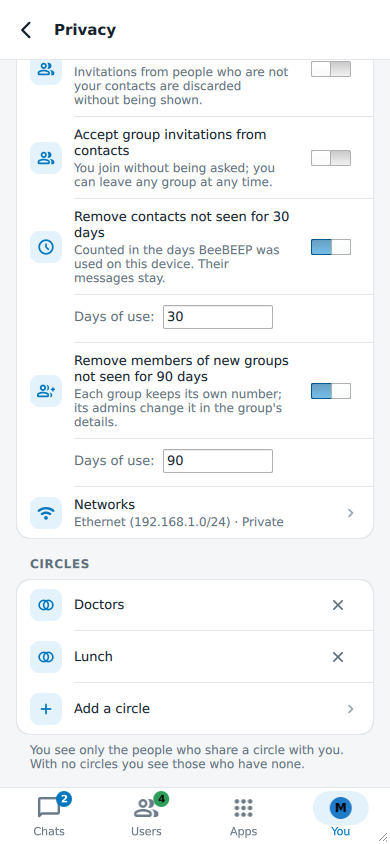
Open Settings > Privacy. The card Circles lists yours, one per row, with Add a circle under them. A line under the card says what circles do.
Add a circle
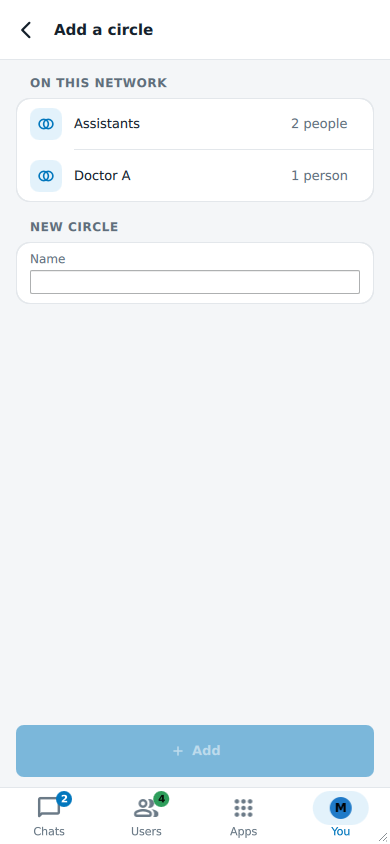
Tap Add a circle. On this network lists the circles other people on your network are in, each with the number of people in it: tap one to join it and go back. Choosing instead of typing keeps three people from writing the same circle three ways. A circle you are already in is not listed.
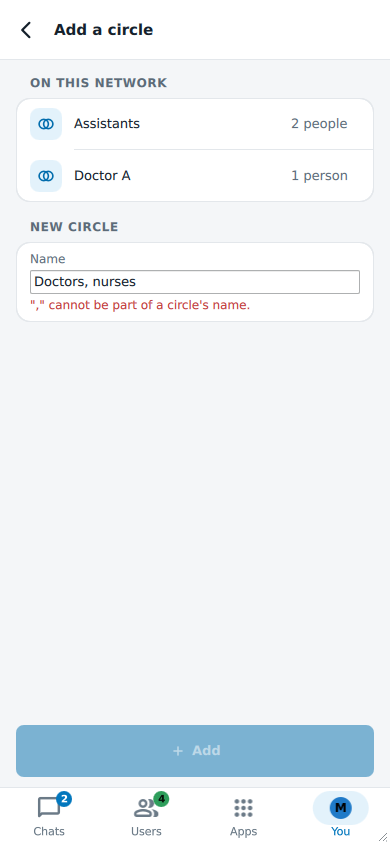
Below, New circle takes a new name. The reason a name is refused shows under the field as you type, and Add stays off until the name can be used.
A circle's name:
- has at most 32 characters, whatever the script: a name in Chinese, Arabic or Latin has the same 32;
has at least one letter or digit, and may hold letters and digits of any script, spaces, currency signs, the apostrophe a phone keyboard types, the Japanese middle dot and these characters:
- _ @ [ ] { } ( ) % & . : # * ! ' / +- never holds a comma, and no emoji;
- is the same circle however it is written in capitals or with extra spaces: Lunch, lunch and LUNCH are one circle. What you see is the spelling its owner wrote.
The whole list has a limit of 320 bytes, counting two for each name besides its text (ten names of twenty letters fit); when there is no room, BeeBEEP says so and asks you to remove one first.
The names of your circles are not secret. BeeBEEP announces them with your name, to everybody on the network, those you do not see too: that is what lets On this network offer the circles already in use. On a network with a network password only whoever knows it can read them.
Remove a circle
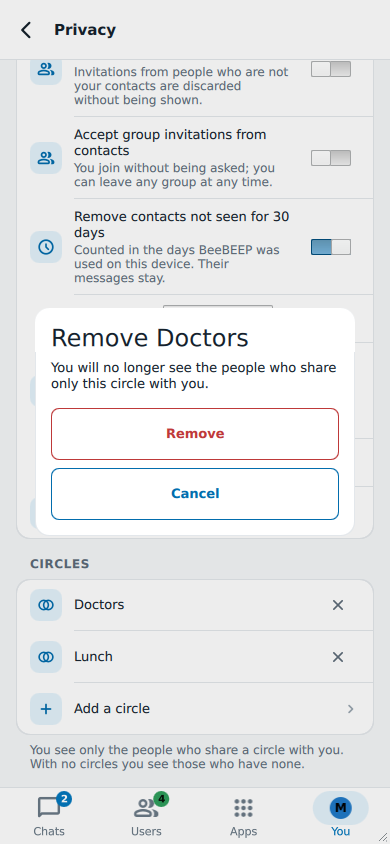
Tap the X on its row and confirm. The question says what changes: you no longer see the people who share only that circle with you, or, when it is your last circle, you see only the people who have none.
A change takes effect at once, with no restart: people who leave your sight go offline in your list, and people who come into it connect.
When an administrator sets them
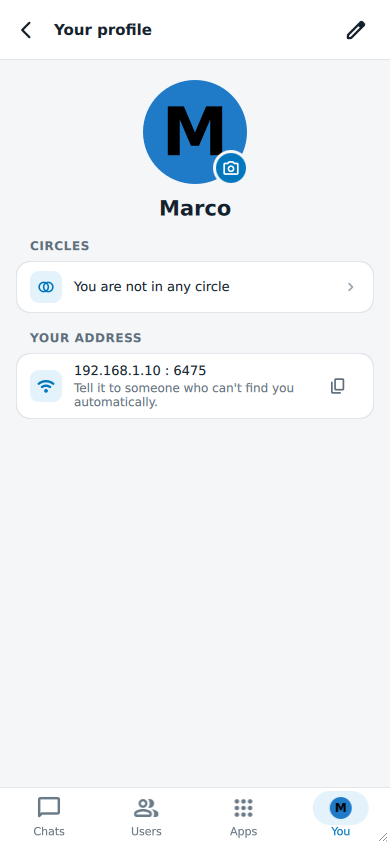
When your administrator has set your circles, the card shows them greyed, each with a shield and a person where the remove icon would be, and there is nothing to add or remove. Point at one on a computer, or tap it on a phone, and it says Set by your administrator. An empty list set that way reads You are not in any circle. How an administrator sets circles is in the circles of the policy file.
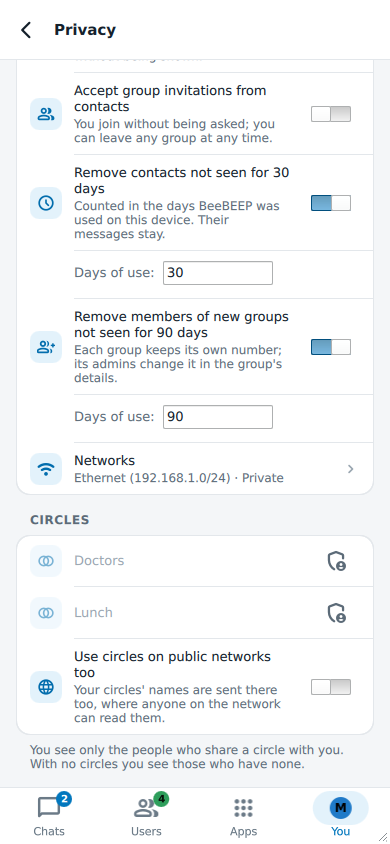
What you see of other people's circles
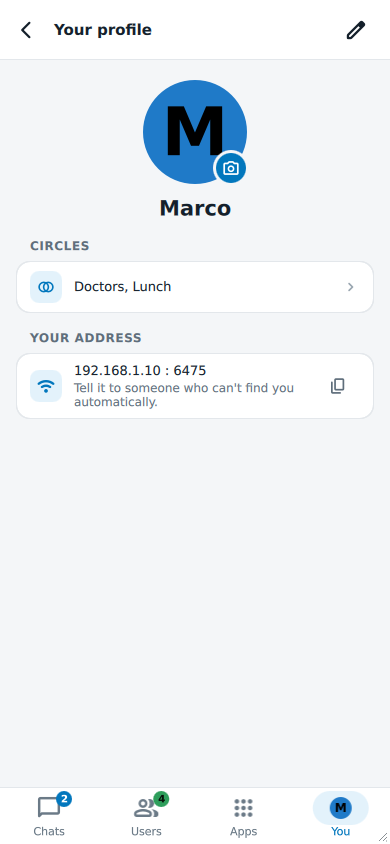
On your profile -- the You tab, where on a phone you tap your name -- the row Circles shows yours, or You are not in any circle, and opens the card above.
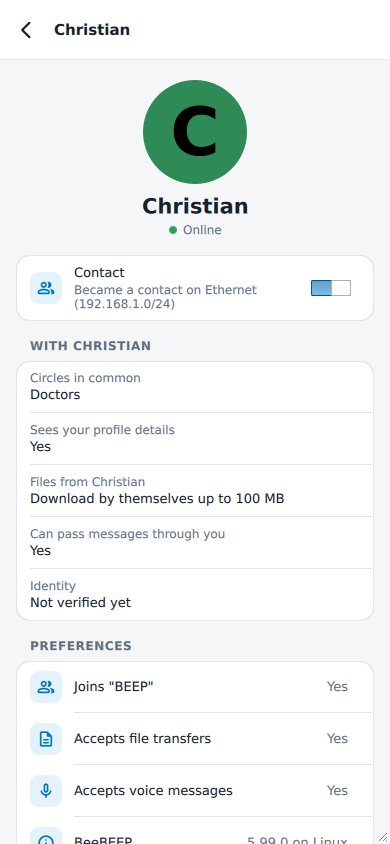
On a contact's details, Circles in common lists the circles you share with them, never the others they are in. When you do not see each other it says None: you do not see each other.
The users grouped by circle
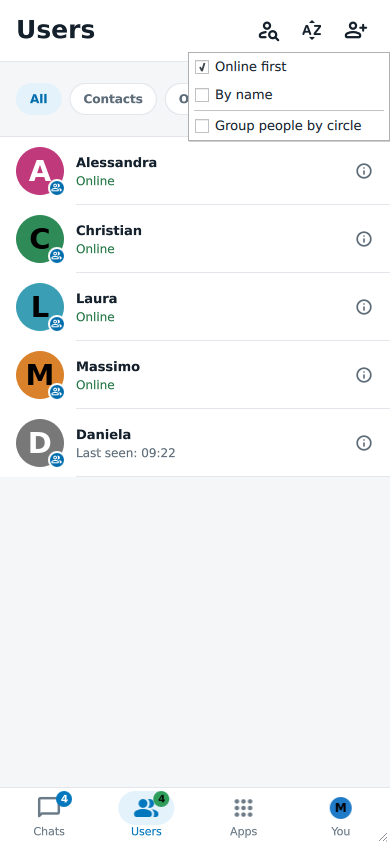
When you have circles, the sort menu of Users (the arrow at the top) gets Group people by circle. Turned on, a person appears under every circle you share with them, so someone in two of your circles is listed twice. Each circle is a header with its icon, its name and the number of people under it; tap a header to fold its people away and again to open them. Others comes last: people who share none of your circles, and those you do not see now. A search opens every circle, so that nobody it finds stays folded away.
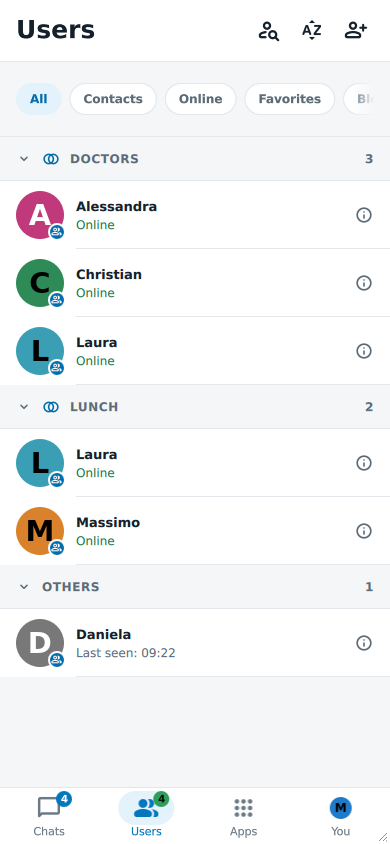
A folded circle shows only its header.
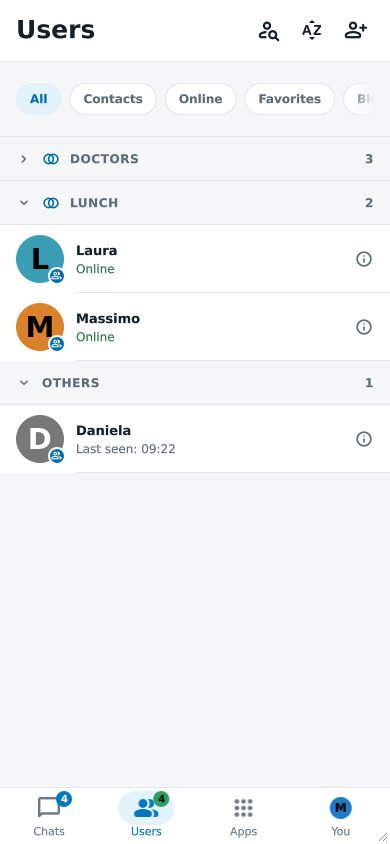
The choice is kept, even when you have no circles for a while. While you have none, the item is not in the menu.
Chats and groups
For groups in general, see groups.
- People out of sight: someone you have never met has no row in the list of users. A person you knew before keeps their row, their chat and its history, and reads as offline while you do not see each other. A message you write to them, before or while they are out of sight, waits, and goes if you ever see each other again.
- BEEP reaches the people you see, and only they write to you there.
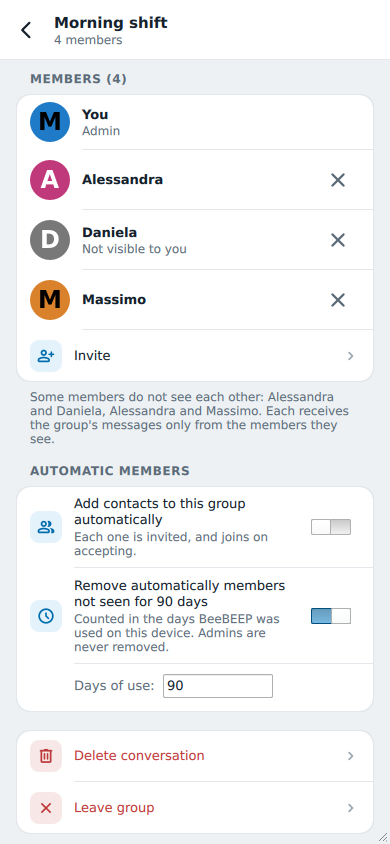
- A group can hold two people who do not see each other: each of them receives the group's messages only from the members they see, and you, who see both, see everything. Your own messages to the group reach only the members you see. In the group's details a member you do not see reads Not visible to you, and the group's admin finds a line under Members naming the pairs who do not see each other.
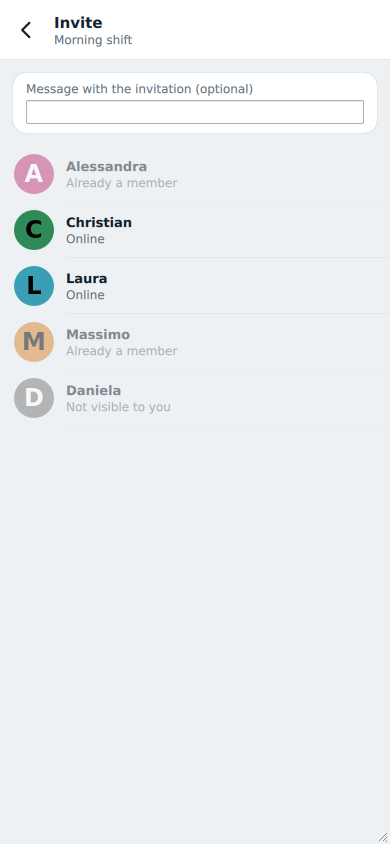
- Inviting to a group: someone you do not see is listed on the invite page, dimmed and with Not visible to you, and cannot be picked.
Through a relay
Two people who reach each other only through a BeeBEEP that relays for both see each other under the same rule: a circle in common, or no circles on either side. The relay node, beebeep-relay, has no circles: it passes messages for everybody, and two people linked to it who share no circle stay out of sight of each other. A BeeBEEP on somebody's computer that relays for others is a user like any other and follows its own circles.
If you come from BeeBEEP 5.x
Circles are the Workgroups of BeeBEEP 5.x with the same purpose, and the same rule, with three differences:
- In BeeBEEP 5.x the filter was an option; in BeeBEEP circles are always a filter, with no switch. Whoever wants to be in a circle and still see everybody joins every circle, and still does not see the people who have none.
- Sight is symmetric. In BeeBEEP 5.x only the side that filtered refused the connection, and the other side kept listing and dialing a person that never came; here neither side shows the other.
- A name never holds a comma, which BeeBEEP 5.x uses to join the list on its wire.
BeeBEEP talks to BeeBEEP 5.x users with circles too: it sends its circles as its workgroups, so a BeeBEEP 5.x user who accepts connections only from its workgroups accepts you when a name matches, and a workgroup of a BeeBEEP 5.x user is its circle. BeeBEEP cannot know whether that user filters by them, so it applies its own half of the rule. When you import a BeeBEEP 5.x installation, its workgroups become your circles only when its option to accept connections only from its workgroups was on, because otherwise they were labels and would hide people, and only while you have no circles of your own and your administrator does not set them; Group people by circle is turned on when the old list was grouped by workgroup. A name longer than 32 characters is shortened to 28 of them, then # and three letters or digits taken from the whole name, the same on every computer.