Groups
What a group is, how people join and leave it, what only an administrator changes, and the two rules a group keeps by itself.
Per: utenti · Da BeeBEEP 6.0.0 · Aggiornata il
Mi dispiace, ma per mancanza di tempo, alcune di queste risorse potrebbero essere solamente in lingua Inglese.
A group is a chat among people you choose, with a history that lasts and messages that wait for a member who is away. This page explains who creates a group, how people join and leave it, what only an administrator can change, and the two rules a group can keep by itself to fill and tidy its list of members.
What a group is
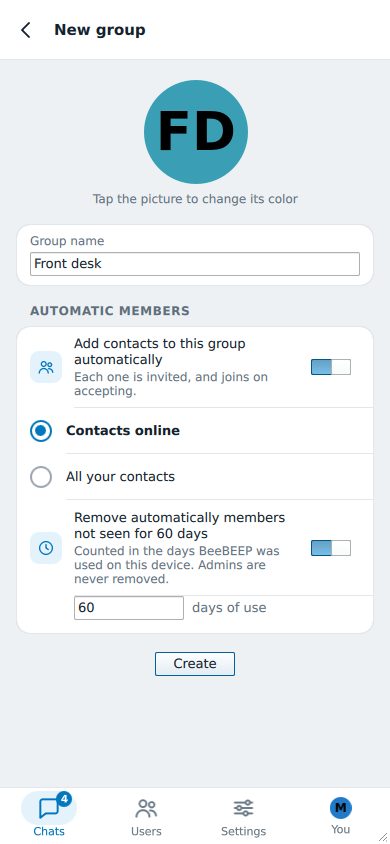
Anyone can create a group: in Chats, tap the + (New group), type the Group name, tap the picture if you want another color and press Create. You are its first administrator.
An administrator is a member who may change the group itself: who is in it, who else is an administrator, its name, its color and its picture. Every other member can read and write in the group, see who is in it and leave it whenever they want. A group can have several administrators, and you can make as many as you like, so the group does not depend on one person being around.
To see a group's details, tap its name at the top of its chat.
For a message to everyone online right now, with nothing to keep, use BEEP instead.
Joining a group
By invitation
Nobody is put into a group without saying yes. An administrator taps Invite under Members in the group's details, chooses one or more of their contacts and may add a short message. Each person receives the invitation in their chat with the administrator, with Accept and Decline.
- Until a person accepts, they are not in the group: they see none of its messages and the members learn nothing about them. When they accept, they join, the members see them, and the chat shows You joined. Earlier messages are not available. at that point.
- An invitation that nobody answers expires after a while. The administrator who sent it sees it under Pending invitations in the group's details and can Withdraw it; leaving the group withdraws all the invitations you sent.
- Only an administrator can invite, and only people who are their contacts. A person who declined can be invited again by hand.
- If you prefer not to be asked, Settings > Privacy has Accept group invitations from contacts, off by default: you join without being asked, and you can leave any group at any time. Group invitations only from contacts discards the invitations of people who are not your contacts without showing them.
A BeeBEEP 5 member
A person who still uses BeeBEEP 5 cannot accept an invitation, so an administrator adds them directly, with the same Invite button. They are in the group at once, as with BeeBEEP 5 itself. The BeeBEEP 5 compatibility page says what else they see and do not see.
Leaving, being removed, coming back
Leave group, at the bottom of the group's details, takes you out; the group asks you to confirm. An administrator can also Remove from group a member, and a group's rules can remove one by themselves, as described below.
Whoever has left or been removed stays out until an administrator invites them again. They are invited as anyone else is, they accept, and they join as a new member: what was written while they were away is not there for them.
What only an administrator changes
| What | Where in the group's details |
|---|---|
| The name | Group settings, Name, then Save |
| The color | Group settings, Color (Tap to change) |
| The picture | Tap the group's picture at the top of the details |
| The members: inviting, removing | Members, Invite and Remove from group |
| The administrators | Administrators, Edit administrators |
| The two rules | Automatic members |
A member who is not an administrator sees these screens without the buttons that change them.
If a group is left with no administrator, because the last one left, its details offer to claim it: anyone in the group can tap to become its administrator.
The two rules of a group
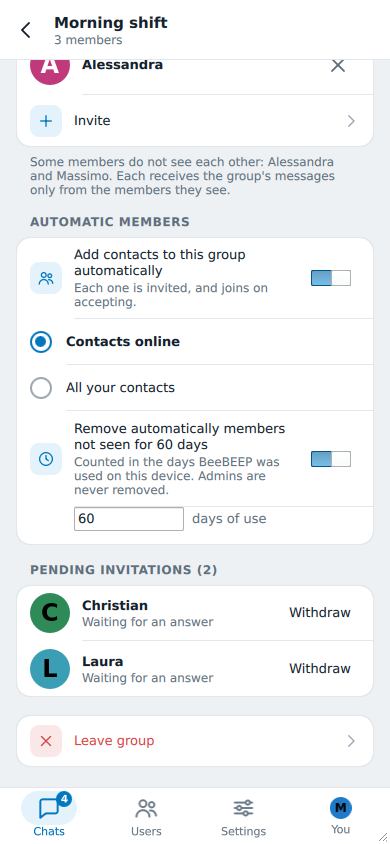
Under Automatic members, a group keeps two rules by itself. Both are off until an administrator turns them on, except that a new group starts with the second one on, with the number of days set in Settings > Privacy (see the default for new groups).
Invite your contacts automatically
Add contacts to this group automatically invites the administrator's contacts, with the usual invitation that each person accepts. You choose which:
- Contacts online: each contact is invited when they come online;
- All your contacts: every contact, online or not.
Nobody is invited who is a member already, who already has an invitation waiting, or who declined one: a "no" is respected. A member the second rule would remove is not invited back. It is how a small office keeps a group of everyone.
Remove members not seen for some days
Remove automatically members not seen for N days removes a member who has not been seen for that many days of use of BeeBEEP, not calendar days: a computer that was switched off for a holiday does not lose its people. Administrators are never removed, and neither are you.
Who sees them and who changes them
Every member sees the rules a group keeps, written in words in the group's details. An administrator changes them, and the last change wins: if two administrators set different rules, the ones set later are the ones the group keeps.
Who applies the rules
- Removing is done by every administrator of the group, each on its own computer: the first one to find a member not seen for long enough removes them, and everyone sees it.
- Inviting automatically is done by the administrator who set the rules last, and to that person's contacts: a group that invites "all your contacts" invites the contacts of whoever set the rules, not of every administrator. Another administrator who wants the invitations to go to their own contacts changes the rules: under the card they read Set by Alessandra. Change them and they become yours, and your contacts are the ones invited. Any change does, even turning a rule off and on again. If the administrator who set the rules is no longer one, nobody invites until an administrator changes them; the members' card then shows only the removal line, and the administrators' card says so.
What you notice
- Days of use are counted on the administrator's own computer. An administrator who opens BeeBEEP every day counts more days than one who opens it once a week, so the first removes a member sooner. If a group needs the same pace from everyone, set a number of days that is long enough for the slowest administrator.
- A member just added is never removed at once: being added counts as being seen that day. And an administrator never removes a member their own BeeBEEP has never seen: the administrators who have seen them do.
- A member removed while away learns it the next time they write in the group.
- A BeeBEEP 5 member does not see the rules, because BeeBEEP 5 has no such card, and is removed like anyone else when the days have passed.
- Removing and inviting are checked about once an hour, and an invitation also goes out the moment a contact comes online.
The default for new groups
Settings > Privacy has Remove members of new groups not seen for N days. The number is the starting point of every group you create from then on; each group keeps its own number afterwards, and its administrators change it in the group's details. Turn the setting off and new groups start with no removal.
See also
- Getting started, for the first group in a few steps.
- Circles: a member who is in none of your circles may not be visible to you, and the group's details say so.
- Chats, for what you can do with a message inside a group.