Chats
What you can do with a message in a chat: reply, forward, react, star, pin, copy, edit your own, delete it for you or for everyone, see its details.
Per: utenti · Da BeeBEEP 6.0.0 · Aggiornata il
Mi dispiace, ma per mancanza di tempo, alcune di queste risorse potrebbero essere solamente in lingua Inglese.
A chat is where you write to one person or to a group. This page explains what you can do with each message once it is there: answer it, pass it on, react to it, keep it in sight, correct or take back one of yours, and see what happened to it. It is for everyone who uses BeeBEEP.
The message menu
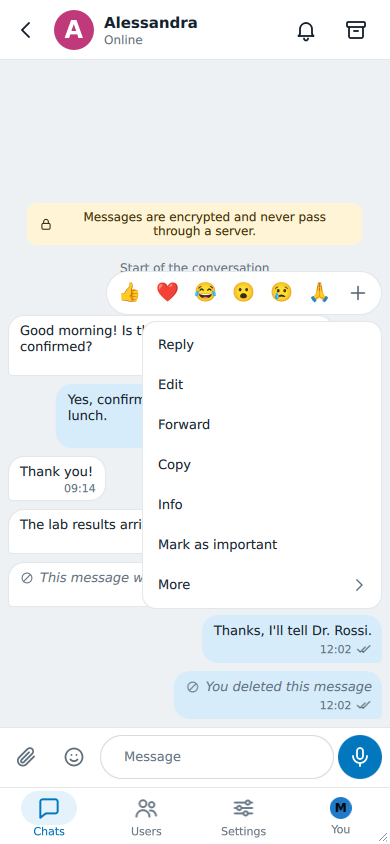
Long-press a message (right-click on a computer) to open its menu. Above it a row of six quick reactions, with + for any other emoji; below it the actions:
- Reply, Edit (on a message of yours you may still change), Forward, Copy (on a message with text), Info, Mark as important;
- More, which turns the menu to its second page: Select, Pin, Delete, and More again to go back.
On a touch screen two gestures are shorter still: swipe a message to the right to reply to it, to the left to open its Info.
Replying
Choose Reply and write your answer: a banner above the field shows the message you are answering, and the cross beside it drops the reply. Your answer carries a quotation of that message; tap the quotation to jump to the original.
Forwarding
Forward opens Forward to..., the list of your chats: tap one and the message is sent there, marked Forwarded from and the name of whoever wrote it. To forward several messages at once, select them first (see Selecting several messages).
What is forwarded is a message's text: a file or a voice message cannot be forwarded. A message is never forwarded into BEEP either: a BEEP is written, not passed on (BEEP).
Reactions
Tap one of the quick reactions in the menu, or + to pick any emoji. You have one reaction per message: the same emoji again takes it back, another one replaces it. The reactions show under the message, with a number when more than one person chose the same emoji; tap one to react the same way, or to take yours back.
Everyone in the chat sees the reactions, except a user of BeeBEEP 5. In BEEP a reaction goes to the author of the message alone (reactions in BEEP).
Important and pinned messages
Mark as important puts a star beside the message's time, so you find it again while scrolling; Unmark as important takes it off.
More > Pin keeps a message at the top of the chat, in a bar that stays there while you scroll: tap its text to jump to the message, and Unpin to remove it. A chat has one pinned message; pinning another one replaces it. A pinned message shows a pin beside its time.
Both are yours alone: nobody else in the chat is told, and their copy of the message does not change.
Copying
Copy puts the text of the message on the clipboard, and a short line says that it was copied. A file or a voice message has no Copy.
Selecting several messages
More > Select turns the chat into a list you tick: tap the messages you want. A bar takes the place of the field you write in and says how many are selected: Actions there copies, forwards or deletes them all at once, and the cross at its start ends the selection.
Editing a message
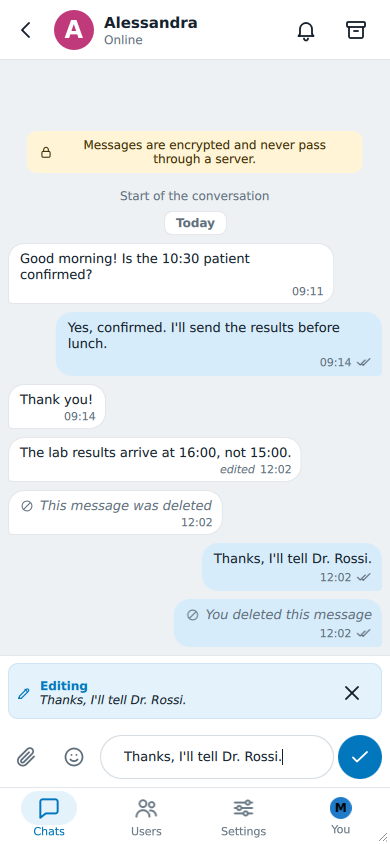
Choose Edit on a message of yours to correct it. The field below takes its text, a banner above it says Editing and shows the message as it was, and the send button becomes a check mark. Change the text and tap the check mark (Return on a computer) to save it, or the cross in the banner (Escape on a computer) to leave it as it was. Whatever you were writing before comes back in the field either way.
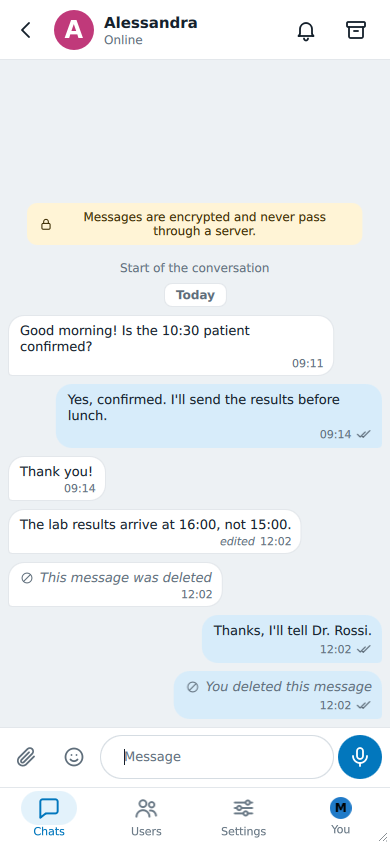
Everyone in the chat sees the new text in the same place, with the same time and the word edited beside it. An edit sends no notification.
You can edit:
- a message you wrote, with text and no file;
- for 15 minutes after writing it, unless your administrator chose another time or turned editing off.
A file, a voice message, a forwarded message and a deleted one cannot be edited. A message nobody has received yet -- the person is offline, say -- is simply sent as you corrected it, with no edited mark.
Each copy keeps only the latest text: nobody can see what a message said before it was edited.
Deleting a message
Choose More, then Delete. What BeeBEEP asks depends on the message.
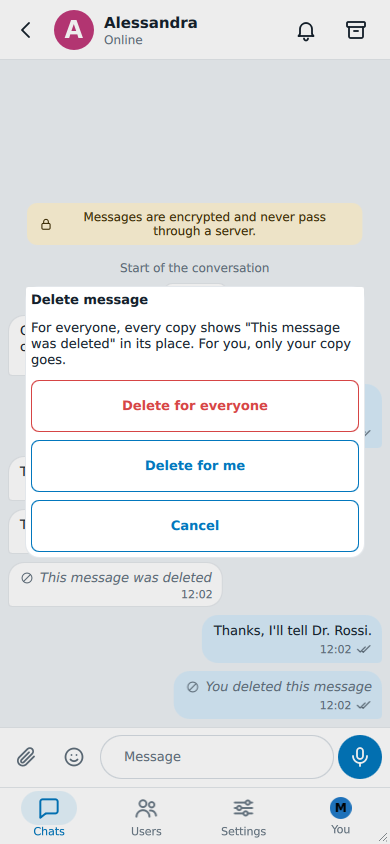
On a message you wrote less than a day ago, you choose:
- Delete for everyone: every copy of the message shows This message was deleted in its place; yours shows You deleted this message.
- Delete for me: only your copy goes; everyone else keeps theirs.
- Cancel: nothing changes.
On someone else's message, or on one of yours past that day, BeeBEEP asks whether to delete it for you only: Yes removes your copy, No leaves it.
A message deleted for everyone keeps its place and its time, so the conversation around it still reads in order. What it said is gone from every copy: its reactions go, a reply that quoted it shows Deleted message instead of the quotation, and in the list of chats a chat whose last message it was shows the same line. A file sent with it that the other person had already saved stays where they saved it; one still downloading is stopped.
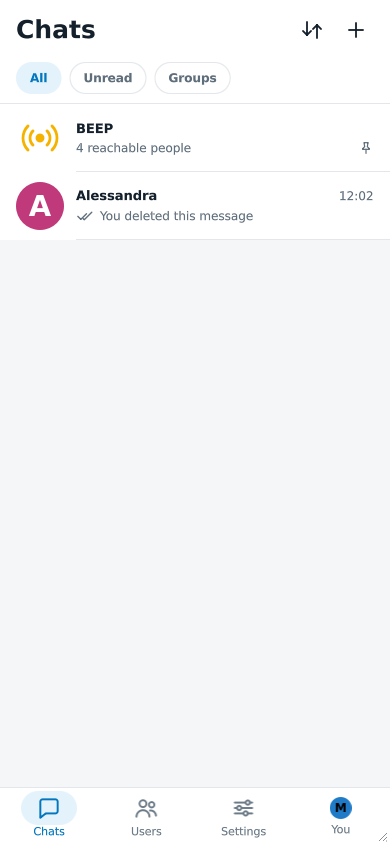
The deleted message keeps a menu with Delete for me, to remove the line from your chat too, and Info.
If you delete a message of yours for you only before it has left -- the person was offline -- it never leaves: nobody receives it.
Deleting for everyone is possible for a day after writing a message, unless your administrator chose another time or turned it off. Selected messages offer the same choice when every one of them can still be deleted for everyone.
Message info
Info opens Message info, everything known about one message:
| Line | Shows |
|---|---|
| Created | when the message was written |
| Edited | when its sender last edited it, if they did |
| Deleted | when its sender deleted it for everyone, if they did |
| Reactions | who reacted, with which emoji, and when |
| Recipients | on a message of yours, each person with Sent, Delivered, Read or Not delivered, and the time |
Every time is given on this device's clock, like the times in the chat. The message itself always shows the time it was written, never the time of a later change.
When a change does not reach everyone
- BeeBEEP 5. A user of BeeBEEP 5 cannot receive an edit or a deletion: their copy stays as it was. After your change, a card above the field says so and names them -- for example Not changed for Laura: BeeBEEP 5 cannot edit or delete a message. -- until you tap OK. A message that had not reached them yet is sent as it is now, or not at all if you deleted it (BeeBEEP 6 and BeeBEEP 5).
- BEEP. A BEEP lives only in the moment: an edit or a deletion reaches the people who received it and are still online.
- Someone offline. Everyone else who has the message receives your change when they are next online, as they would a message.
The time limits
The 15 minutes to edit and the day to delete for everyone are counted from the moment you wrote the message; editing does not extend them. An administrator can change both, or turn either off, for everyone in the office (editing and deleting a sent message). When a limit has passed, Edit is no longer in the menu and Delete deletes for you only.