Frequently asked questions
Answers to the problems people meet first: nobody online, networks, a relay, the firewall, data, BeeBEEP 5.x, keys, files, the clock.
Per: utenti, amministratori · Da BeeBEEP 6.0.0 · Aggiornata il
Alcune pagine sono solo in inglese.
Short answers to the questions people ask first. Each one says what to check, in the order that finds the cause fastest, and links the page that goes further. If you have not yet installed BeeBEEP or sent a first message, start with getting started.
I don't see anyone online
BeeBEEP finds the other users of your network by itself, usually within a moment. When the list stays empty, check these, in this order:
- BeeBEEP is running on the other device. It has to be running to be found.
- Both devices are on the same network: the same Wi-Fi or the same cable. A guest Wi-Fi keeps its devices apart, and so do some routers between a cable and a Wi-Fi: see Wi-Fi networks that keep devices apart.
- A firewall is not in the way. On Windows, allow BeeBEEP in Windows Firewall. On macOS, open System Settings > Network > Firewall and allow incoming connections for BeeBEEP. On Linux, open the two ports of the next question. On an iPhone or iPad, open the Settings of the device, then BeeBEEP, and turn on Local Network.
- The network password is the same everywhere. If one computer uses a network password (Settings > Network > Use network password), every computer of the network needs the same one: someone under another password is not seen at all.
- You share a circle. If you are in a circle, you see only the people who share one with you, and with no circles you see only people with none. Look at Settings > Privacy, or read circles.
- A person on BeeBEEP 5.x is seen only when you allow it: see Can I talk to someone who still uses BeeBEEP 5.x.
Then open Users, tap Find or add users (the +) and press Search: BeeBEEP announces itself again on the network. If you know where the other computer is, you can name it by its address, as finding the people you want to reach says. The same screen has a switch for each way Search looks: Network, Bluetooth, to find people nearby without a shared Wi-Fi, and Multicast, for networks that pass no broadcast.
Does BeeBEEP send my messages through a server or over the Internet
No. BeeBEEP has no server and no account. Your device connects to the devices of the other users, directly, and everything it sends is encrypted: a chat says so at the top, Messages are encrypted and never pass through a server. It needs no Internet connection, only a network that connects you to the others. The one time BeeBEEP contacts a web server is the check for a new version: when the Internet is there, it reads a small signed file on the BeeBEEP website and tells you whether a new version exists, and never downloads or installs anything by itself. Your messages, your name and your contacts are never sent; an administrator can switch the check off (the policy file).
Two things can make a message pass through another device of your network, both for people who cannot reach each other directly:
- A relay. A user can let their BeeBEEP pass messages on for others, and the messages are not shown on that device. You choose whether your own BeeBEEP does it, in Settings > Network > Relay messages for others: for everyone, only for your contacts, or never.
- Bluetooth. BeeBEEP can find a person nearby without a shared Wi-Fi network, with the Bluetooth switch of Find or add users.
I can't reach someone on another network or on a VPN
BeeBEEP's announcements stay on the network they are sent on, so a computer on another subnet, behind a router or on a VPN such as Tailscale is not found by itself. It has to be named once, by its address or its host name. Open Users, tap the +, and under Add a user by address write its address and its port, as finding the people you want to reach shows; using BeeBEEP over a VPN walks you through it. For many computers, one file copied to all of them does it: reaching computers on other networks explains it, with the network's address and a VPN's name.
Two devices of the network cannot reach each other
Sometimes two people are on the same network and still cannot connect: a Wi-Fi that keeps its devices apart, a router between the cable and the Wi-Fi, a firewall on one of the two, or one of them on another network that only one side can reach. A relay solves it: a third BeeBEEP that both of them can reach passes their messages from one to the other. The messages stay encrypted end to end, so the relay cannot read them and never shows them.
- Any BeeBEEP on a computer can be the relay, while it is running: Relay messages for others in Settings > Network, on for everyone by default on a computer (relay messages for others). A computer connected by cable is the best choice, since wireless devices usually reach it.
- For an office,
beebeep-relayis BeeBEEP with no window, made to run all the time on a computer that stays on, such as a server: the relay then does not depend on a colleague's computer being switched on. It passes messages for everyone, whatever their circles, and two people who share no circle still do not see each other through it. It is a download of its own. If your network uses a network password, the relay needs the same one (--network-password-file).
Chats and groups pass through a relay. A file does not: you see that it was sent, and it downloads once the two devices can connect directly (see files).
What a relay does not do:
- It keeps no messages for someone who is offline. A message waits on the sender's device and leaves when the recipient can be reached, directly or through the relay: the two of you have to be online at the same time.
- It does not connect networks that cannot reach it. Both devices have to reach the relay. On another network or a VPN, name it by its address, as reaching computers on other networks explains.
A Wi-Fi that keeps its devices apart has a page of its own: Wi-Fi networks that keep devices apart.
Which ports does the firewall have to let through
| Port | Protocol | Used for |
|---|---|---|
6475 | TCP | the connection itself (the Listening port) |
36475 | UDP | the announcement that asks the other side to connect |
6475 | UDP | the voice of a call; if it is blocked, the call goes over the TCP connection with a little more delay |
The Listening port of your device is in Settings > Network. On Windows, the installer writes a firewall rule by itself (installing on Windows); on a VPN, allow BeeBEEP on the network the VPN creates, as reaching computers on other networks says.
Why does the Windows installer open the firewall on public networks
Because Windows calls every network it has not seen before Public, and that is where the first computer of a new office usually is. With no rule there, that computer could not be reached, and the people around it would not find it. Who BeeBEEP talks to on a public network is decided by BeeBEEP: the network's classification and, if you set one, the network password.
An administrator who prefers otherwise can install with /FIREWALL=private (FIREWALL=private for the MSI): the rule then holds on Domain and Private networks only. On a Public network that computer is then nearly invisible, since other devices can neither connect to it nor hear it announce itself, and Windows asks about BeeBEEP at its first start there. See the firewall rule.
Where are my data and my log
Everything BeeBEEP keeps for you is in one folder, the data folder: your settings, the encrypted database of your chats and the daily log files. On a computer, Settings > Data > Open data folder opens it. Where it is on your system, and how an administrator moves it, is on settings for administrators. A log file is named beebeep-<year>-<month>-<day>.log, and BeeBEEP deletes the ones older than 7 days. When you are asked for a more detailed log, turn on Settings > Help > Turn on panic log and close and open BeeBEEP again: it then writes everything, which is meant for troubleshooting one report only. What to send with a log, and where, is on report a problem.
How do I move BeeBEEP to another computer
With a backup. On the old computer, Settings > Data > Back up... saves one file; take it to the new computer, install BeeBEEP and, on its first screen, choose Restore from a backup file.... You are then the same person, with your chats and contacts, and your contacts see the same security key. Then stop using BeeBEEP on the old computer. Copying the data folder is not enough: the key that unlocks it stays on the computer it was made on. Backing up and restoring says each step.
Can I talk to someone who still uses BeeBEEP 5.x
Yes. Settings > Network > Talk to BeeBEEP 5.x users lets BeeBEEP connect to people who still use version 5; when it is off, they are not seen. Their chats, files and voice messages travel with the older version's encryption, which is weaker, and BeeBEEP says so in their chat. The Apps tab has Import from BeeBEEP 5.x, which brings your contacts, groups and profile from an old installation on the same computer, and its saved chats: you read them, as they were, in Archive at the top of the chat list, and a contact's or group's old messages also open from its chat. The archive tells more.
How do I see only the people of my team
With circles. A circle is a name, and people who share one see each other. Open Settings > Privacy, tap Add a circle and join the circle of your team: you then see only the people who are in it, and they see you. Circles explains the rule, with examples.
A chat says the security key has changed
Every BeeBEEP has a security key that proves who it is, and your messages to a person are encrypted with theirs. A person's key changes when they start again from scratch -- a new computer, a new account, a lost data folder -- or when someone else presents itself as them. Uninstalling and installing BeeBEEP again keeps it. By default BeeBEEP accepts the new key of a contact by itself, unless you verified that contact in person; when it does not, a banner at the top of the chat says the key changed.
Ask the person, in person or by another way you trust, whether they started again on a new computer or lost their data. If they did, tap Update key... in the banner and confirm. If they did not, do not update it: the messages you would send could be read by someone else. Until you update it, messages with that person that pass through other users cannot be delivered. Settings > Security > Accept new security keys automatically chooses whether you confirm each new key yourself.
BeeBEEP says my profile is open on another device
A bar at the top of BeeBEEP says Your profile is open on another device. BeeBEEP does not connect to that device, and the other device is told the same. What the bar says under its title tells the two cases apart.
The same profile and the same security key: "BeeBEEP is open with your profile on another device too. Quit BeeBEEP on the one you no longer use." The other device is a copy of this one: a backup restored there, or BeeBEEP's data folder copied to it. It is you on both, so quit BeeBEEP on the device you no longer use, as Backing up and restoring asks after a restore.
The same profile with a different security key: the bar names the other device's network address in brackets, or Bluetooth. The two cannot both be you. Most often it is still you, BeeBEEP open on two devices with the same profile: keep it open on one device at a time. If it is not you, someone else is using your profile: tell whoever manages your network.
Both bars offer Use a separate identity on this computer (on this device on a phone or a tablet), except on iOS: BeeBEEP starts again as a new person there, your chats kept, and your contacts must add you again or link you to the contact they had. Close hides the bar until BeeBEEP starts again or yet another device shows up with your profile.
BeeBEEP says it can't unlock my data
BeeBEEP encrypts its data with a key it makes itself and keeps safe; you never type it. If BeeBEEP cannot open the data with the key it has, it shows Can't unlock your data, and your data is not changed. Start fresh instead starts with new, empty data and sets the old data aside on disk, without ever deleting it. If you have a backup, Restore from a backup file... on the same screen puts it in place instead, and so it does on This computer does not have the key that unlocks your data., which a data folder copied from another computer shows (the backup page).
A file waits for me and does not download
A file offered by someone who is not your contact always waits for you: the chat shows it with Accept and Reject. A contact's files download by themselves, up to the size set in Settings > Preferences > Download automatically; a larger one waits too. To see who is a contact, open Users: a contact is marked Contact. A user becomes a contact when you turn on the Contact switch in their details, or when you meet them on a network you called Private. Sending and receiving files says more.
I deleted a message: is it really gone
It depends on which delete you chose, and on where the copies are.
- Delete for me removes your copy only: everyone else keeps theirs. Delete for everyone, on a message you wrote less than a day ago, removes it from every copy: each shows This message was deleted instead. Someone who is offline gets the deletion when they come back; someone on BeeBEEP 5.x keeps the message, because 5.x cannot delete one. Chats says more.
- Delete conversation removes every message of a chat from this device only; the others keep theirs. Files you saved stay where you saved them.
What stays in BeeBEEP's own files: they are always encrypted, so a deleted message cannot be read by anyone who does not have your key. With Always delete data securely on, in Settings > Security, nothing of it stays in the files at all, even for someone who gets the key later (Settings).
What BeeBEEP cannot reach: a backup you made, a snapshot of the disk, the copies on the other people's devices, and what the disk itself keeps of a file's old place (an SSD especially) until it writes over it.
The space on the disk comes back by itself a few seconds after you delete: BeeBEEP gives it back to the system while you go on using it.
My computer's clock is wrong
A computer with a flat clock battery and no internet can start with a date years in the past; a clock set by hand can be ahead. BeeBEEP never changes your device's clock -- that belongs to your system, or to whoever manages your network -- and it never lets a wrong clock mix up your chats.
BeeBEEP knows two things your clock cannot change: the day your copy of BeeBEEP was made, and the last time it ran on this device. When your clock says a date before either of them, BeeBEEP keeps its own time from there, counting on from the last moment it knows, so your new messages always come after the ones you already have.
If the clock is wrong by more than a day, a bar at the top says Your device's clock looks wrong and shows the date it reads.
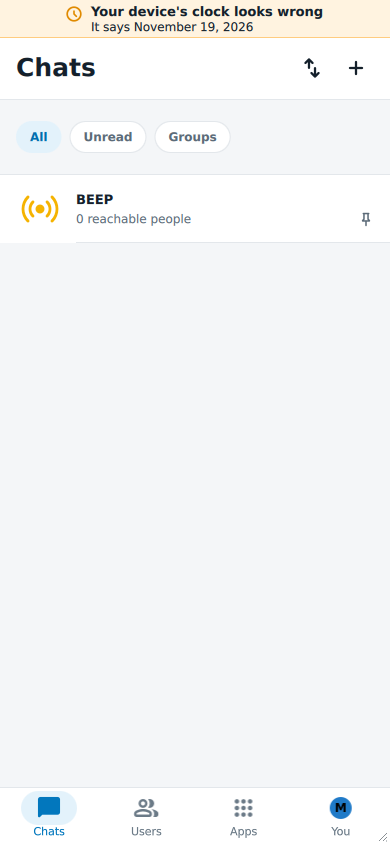
Tap it to see what BeeBEEP found and to answer:
- Use this time: set the right date and time for BeeBEEP alone. It lasts until your device's clock is corrected; correcting the clock in your system is always the better answer.
- The clock is right, shown when the clock is right now but was ahead the last time BeeBEEP ran: BeeBEEP takes your device's time and stops asking.
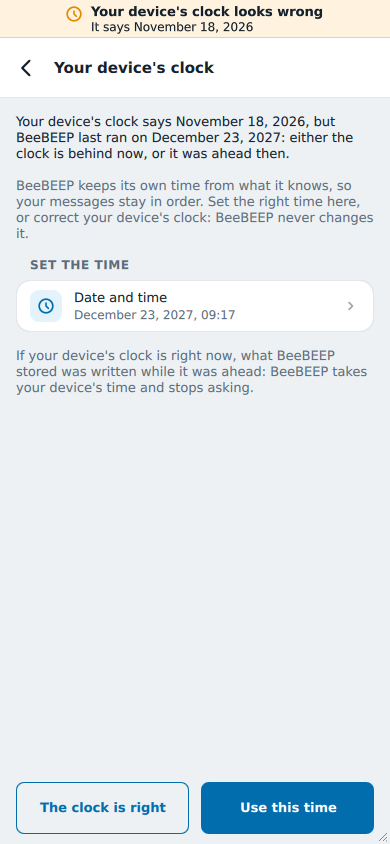
Someone else's wrong clock does not change your chats either: their messages are placed by your own device, as the next answer says. Over Bluetooth, people nearby may not see your BEEPs while your clock looks wrong; the box where you write a BEEP says so.
Why does a message show a different time than the sender saw
Every message is stored and sent as one moment, the same everywhere in the world, and each device shows it in its own time zone: a message written at 10:00 in Rome shows 09:00 to a colleague in London and 10:00 to you. Change your device's time zone and every time in your chats follows it; nothing is lost.
Where a message goes in a chat is decided by your device, never by the sender's clock. A message sent the moment it was written goes at the bottom, after what you already have. One that waited -- written two hours ago by someone who was away from the network -- goes two hours back, on every device that receives it, so everyone sees the same chat in the same order. To know how long a message waited, BeeBEEP measures the time between writing and sending on the sender's own clock, which is right even when that clock shows the wrong date.
The times in a message's information (when it reached each person, when they read it) are the times your device received each answer, never the time the other device's clock showed.