Installing on Linux
The deb package, the AppImage and the tar.gz, what the system needs, where the data is, the tray, the firewall, BeeBEEP 5.x and uninstalling.
For: administrators, users · From BeeBEEP 6.0.0 · Updated on
BeeBEEP for Linux comes in three forms: a deb package, an AppImage and a tar.gz. This page says which one to take, the exact lines that install and start each of them, where each keeps your data, and what to do about the system tray, the firewall and an older BeeBEEP 5.x on the same computer.
The downloads
| File | For |
|---|---|
beebeep_<version>-1_amd64.deb | Debian, Ubuntu and the systems built on them: installed for every account, in the applications menu, updated by installing a newer package |
BeeBEEP-<version>-x86_64.AppImage | any other distribution: one file you run, nothing installed |
beebeep-<version>-linux-x86_64.tar.gz | a folder you carry, on a USB stick for example: it keeps its data beside the program |
The three carry the same program, with voice calls and screen sharing. The headless node beebeep-relay is a download of its own, with its own instructions.
What the system needs
A 64-bit Intel or AMD computer with Ubuntu 22.04, Debian 12 or a newer system -- distributions from 2022 on. BeeBEEP is tried on Ubuntu 22.04 and 24.04 and on Debian 12 and 13. It brings its own Qt; the system gives the rest, which every desktop already has: the graphics libraries, fonts, OpenSSL 3 and D-Bus. It runs on X11 and on Wayland.
The deb package
Download the package, then, in the folder where it is:
sudo apt install ./beebeep_<version>-1_amd64.deb
apt installs what the package needs from your system's own archive. Start BeeBEEP from the applications menu, or type beebeep in a terminal. The program goes into /usr/lib/beebeep, the command into /usr/bin/beebeep, the menu entry and the icon into /usr/share.
The AppImage
Make the file executable once, then run it:
chmod +x BeeBEEP-<version>-x86_64.AppImage
./BeeBEEP-<version>-x86_64.AppImage
You can also double-click it in your file manager once it is executable.
An AppImage needs FUSE to open itself. If it does not start and says FUSE is missing, install your system's fuse3 package, or run it without FUSE -- it unpacks itself into a temporary folder each time:
./BeeBEEP-<version>-x86_64.AppImage --appimage-extract-and-run
The tar.gz
tar -xzf beebeep-<version>-linux-x86_64.tar.gz
cd beebeep-<version>-linux-x86_64
./beebeep
To add it to your applications menu, copy share/applications/beebeep.desktop to ~/.local/share/applications/, change its Exec= line to the full path of ./beebeep, and copy the folder share/icons/ to ~/.local/share/icons/. The folder's README-LINUX.txt says the same.
Where your data is
| Form | Folder |
|---|---|
| the deb package, the AppImage | ~/.config/MarcoMastroddiSW/BeeBEEP of your account (under $XDG_CONFIG_HOME in place of ~/.config when your system sets it) |
| the tar.gz, in a folder you can write to | beebeep-data beside the program |
| the tar.gz, in a folder you cannot write to | the same folder as the deb package |
The folder holds your settings, your messages and the log. Started with --data-folder=<path>, BeeBEEP uses that folder instead.
The deb package and the AppImage keep the key that unlocks your data in your account's keyring. A tar.gz that keeps beebeep-data beside the program keeps that key there too, with the data: the folder opens on any computer you carry it to, and whoever copies it can read your messages. BeeBEEP says so once, in a notice at the top of its window. See also where the log is.
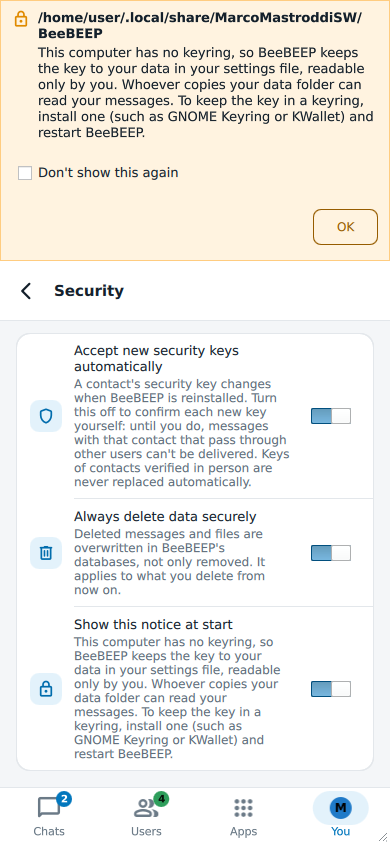
On a computer with no keyring (neither GNOME Keyring nor KWallet, as on some minimal installs), the deb package and the AppImage keep that key in your settings file instead, readable only by your account, and say so in a notice at the top of the window at each start. Whoever copies your data folder can then read your messages. Install a keyring and start BeeBEEP again: the key moves into it, and the notice goes.
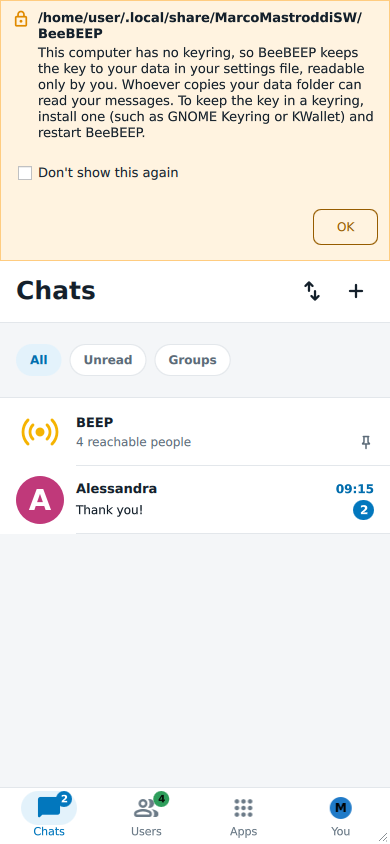
Don't show this again hides the notice; Settings > Security > Show this notice at start brings it back.
The system tray
On most desktops BeeBEEP shows its icon in the system tray, and closing the window leaves it running there: messages keep arriving. Click the icon to bring the window back; choose Quit in its menu to quit.
GNOME shows no system tray unless its AppIndicator extension is on (Ubuntu turns it on; Debian and others leave it to you). Without a tray, closing the window minimizes it instead, so that it can always come back from the window list, and Settings > General says so under Closing the window minimizes to the system tray instead of quitting. To have the icon, install and turn on the AppIndicator extension of your GNOME.
Start at login
Start BeeBEEP when you log in, under Advanced options at the first start and in Settings > General, writes the entry ~/.config/autostart/beebeep.desktop, which every desktop following the freedesktop.org rules starts at login; turning it off removes it. It is on by default for the deb package and the AppImage, off for a tar.gz that keeps its data beside it. For the AppImage the entry names the AppImage file itself: if you move the file, start it once from its new place and BeeBEEP writes the entry again. An administrator sets the default for everybody: see settings for administrators.
The firewall
Most desktop systems have no firewall on. If yours has one, it must let through TCP and UDP port 6475 and UDP port 36475 (the table is in what the network must let through). When BeeBEEP finds nobody, its first-contact panel asks Does the firewall let it through? and answers with the two ports that matter most: "If one is on, open TCP port 6475 and UDP port 36475." UDP 6475 carries the voice of calls, which fall back to the TCP connection when it is closed.
With ufw (Ubuntu, Debian):
sudo ufw allow 6475
sudo ufw allow 36475/udp
With firewalld (Fedora and others):
sudo firewall-cmd --permanent --add-port=6475/tcp --add-port=6475/udp --add-port=36475/udp
sudo firewall-cmd --reload
If you changed the Listening port in Settings > Network, open that port instead of 6475.
BeeBEEP 5.x on the same computer
The deb package has the same name as BeeBEEP 5.x's, beebeep, so apt installs it over BeeBEEP 5.x as an upgrade. BeeBEEP 5.x's folder (~/.local/share/MarcoMastroddiSW/BeeBEEP) is left as it was and never written: this BeeBEEP keeps its own data elsewhere.
To go back, install BeeBEEP 5.x's package again; apt asks you to allow the downgrade:
sudo apt install --allow-downgrades ./beebeep_5.8.6_amd64.deb
Nothing of this BeeBEEP is left in the system after that; its own data folder stays until you delete it. To keep both at once, use the AppImage or the tar.gz of this BeeBEEP beside BeeBEEP 5.x's package.
Uninstalling
First turn off Start BeeBEEP when you log in in Settings > General, if it is on. Then:
- The deb package:
sudo apt remove beebeep. - The AppImage: delete the file.
- The tar.gz: delete the folder.
What stays in your account
Removing the program leaves what it wrote in your account, since a package never touches the files in people's home folders, and BeeBEEP cannot tell its last run from any other. Delete what you no longer want:
The start-at-login entry, if you did not turn it off:
~/.config/autostart/beebeep.desktop. Your desktop skips it once the program it names is gone; nothing else removes it.rm ~/.config/autostart/beebeep.desktop- Your data: its folder (see where your data is), with your messages, contacts, settings and the log.
The key that unlocks your data (the deb package and the AppImage), kept in your keyring under the name
BeeBEEP(GNOME's Passwords and Keys, KDE's KWallet). It is one key for every BeeBEEP data folder of your account: delete it only once you have deleted them all, since without it they cannot be opened any more. A tar.gz that keepsbeebeep-databeside the program keeps its key there, and it goes with that folder. On GNOME and most other desktops, with thelibsecret-toolspackage:secret-tool clear server BeeBEEP- A notification icon, in
~/.cache/MarcoMastroddiSW/BeeBEEP. - Temporary copies of the photos, voice messages, screenshots and texts you sent, in your temporary folder (
$TMPDIR, else/tmp):beebeep-media,beebeep-voice-notes,beebeep-screenshots,beebeep-reduced,beebeep-convertedandbeebeep-texts. Most systems empty/tmpat every restart.
The files you received stay where they were saved, in your Downloads folder unless you chose another: they are yours.