Code
Send source code, a configuration or a log so that it arrives exactly as written, and read, search, copy and save the code you receive.
Per: utenti · Da BeeBEEP 6.0.0 · Aggiornata il
Alcune pagine sono solo in inglese.
A code message carries source code, a configuration or a log exactly as it was written: every space, tab and empty line, in a fixed-width font, with nothing in it taken for a mention or a link. This page explains how to send one, how to read and copy the code you receive, and what happens with someone still on BeeBEEP 5.x. It is for everyone who uses BeeBEEP.
Where code works
A code works in a group and in a chat with one person. It never works in BEEP, which takes plain text only.
A code is a message like any other: it waits for someone who is offline, arrives on every device of the chat, can be edited or deleted for everyone like an ordinary message, and its first line shows in the chat list, in the notification and in a reply that quotes it, as "Code: ...".
Sending code
Sending code is for a computer, where code is written. On a phone or a tablet you read and copy the code you receive, but Send code is not in the menu.
- Click + beside the field and choose Send code. The Send code screen opens over the chat.
- Write its Language (optional): as you type, a list shows the languages that contain what you typed -- the common ones and BeeBEEP's own, such as QML, Qt UI or Objective-C; pick one with a click, or with the arrow keys and Return. The arrow at the end of the field shows the whole list, the languages you used last at the top. Any other name is taken too. The language is shown at the top of the code and names the file when the code goes as one; leave it empty and the code is headed just Code.
- Paste the code into the field. Tab writes a tab, as in an editor; Ctrl+Tab moves to the next control. Under the field you see how many lines and characters it has.
- Click Send, or press Ctrl+Return.
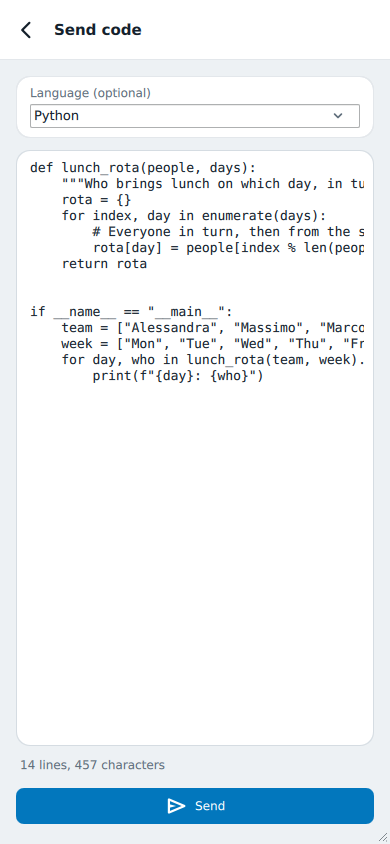
A paste is never cut: if the code is too long, the screen says so and keeps all of it.
Long code goes as a file
Long code is easier to read as a file. From 4,000 characters the screen says so and offers Send as a file beside Send: the code goes as a file named after its language, snippet-...py for Python, and arrives as any file. Over 10,000 characters a code cannot be a message, and Send as a file is the only way.
Reading code in the chat
In the chat a code shows its language and its first twelve lines. A long line does not wrap: it scrolls sideways inside the code, without moving the chat. When there is more, a line under the code says how many lines are left.
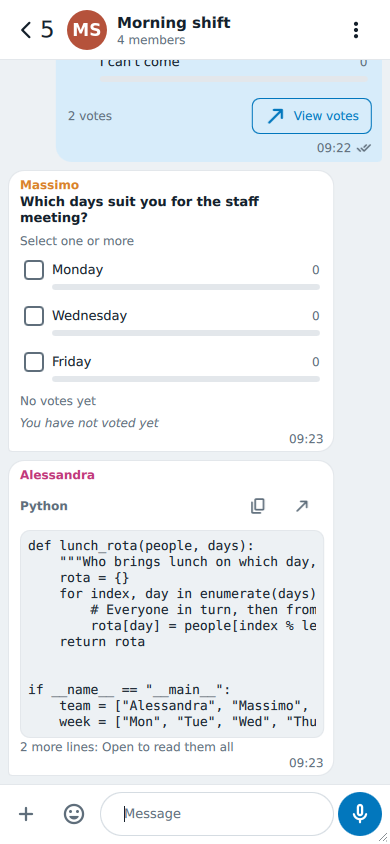
Two icons at its top:
- Copy copies all of the code, whatever is shown. The message's own Copy does the same.
- Open shows the whole code.
A search in the chat finds words inside a code too, and marks them there.
Reading the whole code
Open shows the code with its line numbers, in the same fixed-width font.
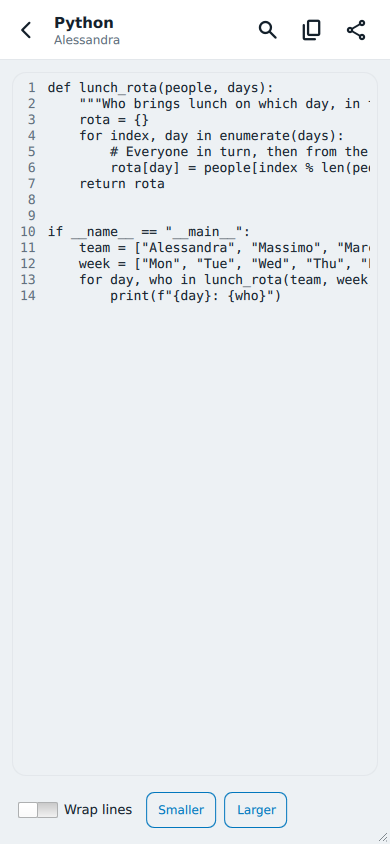
- Search opens a field: type at least three characters and every match is marked, with how many there are.
- Copy copies all of it.
- Save as... writes the code into a file where you choose. Until you do, it is kept only inside BeeBEEP, encrypted like every message.
- Wrap lines wraps the long lines instead of scrolling them.
- Smaller and Larger change the size of the text; BeeBEEP remembers it.
The code is read only here: to change a code you sent, use Edit on the message, which opens it on the same screen you sent it from.
With BeeBEEP 5.x
Someone still on BeeBEEP 5.x receives your code as their own code message, and can send you theirs: it arrives here as a code.
If they send a code to their Chat with all users, it reaches you in your chat with them, marked as sent to BEEP, and BEEP shows its first line with More... to open it there (BeeBEEP and BeeBEEP 5.x).